AI chatbot guide
Build an AI chatbot with AI
A real chat UI on your domain backed by OpenAI or Claude, with conversation history, optional knowledge-base retrieval, and an embeddable widget. Skip the $99/month chatbot vendors.
01 / What you can build
Real projects, not toy examples.
People are shipping these ai chatbots on Webtwizz this quarter. Each one is a complete app: real auth, real data, real money flowing through Stripe.
Customer-support chatbot
Trained on your docs and FAQ, escalates to a human via Intercom or email when stuck.
Product-feature chatbot
A chat-based UI that wraps an OpenAI/Claude call to do specific work: write copy, generate code, summarize PDFs.
Internal-knowledge chatbot
Search your team’s docs, slack history, or wiki. Embeddings via Supabase Vector or Pinecone.
Lead-gen chatbot for a marketing site
Asks visitor questions, qualifies them, drops the lead into your CRM or Resend list.
02 / The build
From a sentence to a deployed app.
5 ordered steps. No config files, no devops, no SQL migrations to write by hand.
Describe the chatbot you want
Prompt Webtwizz: "An AI chatbot for my SaaS that answers questions using my product docs, asks for an email if the user is stuck, and escalates to support via Resend." Webtwizz scaffolds the chat UI + backend route.
Connect OpenAI or Anthropic
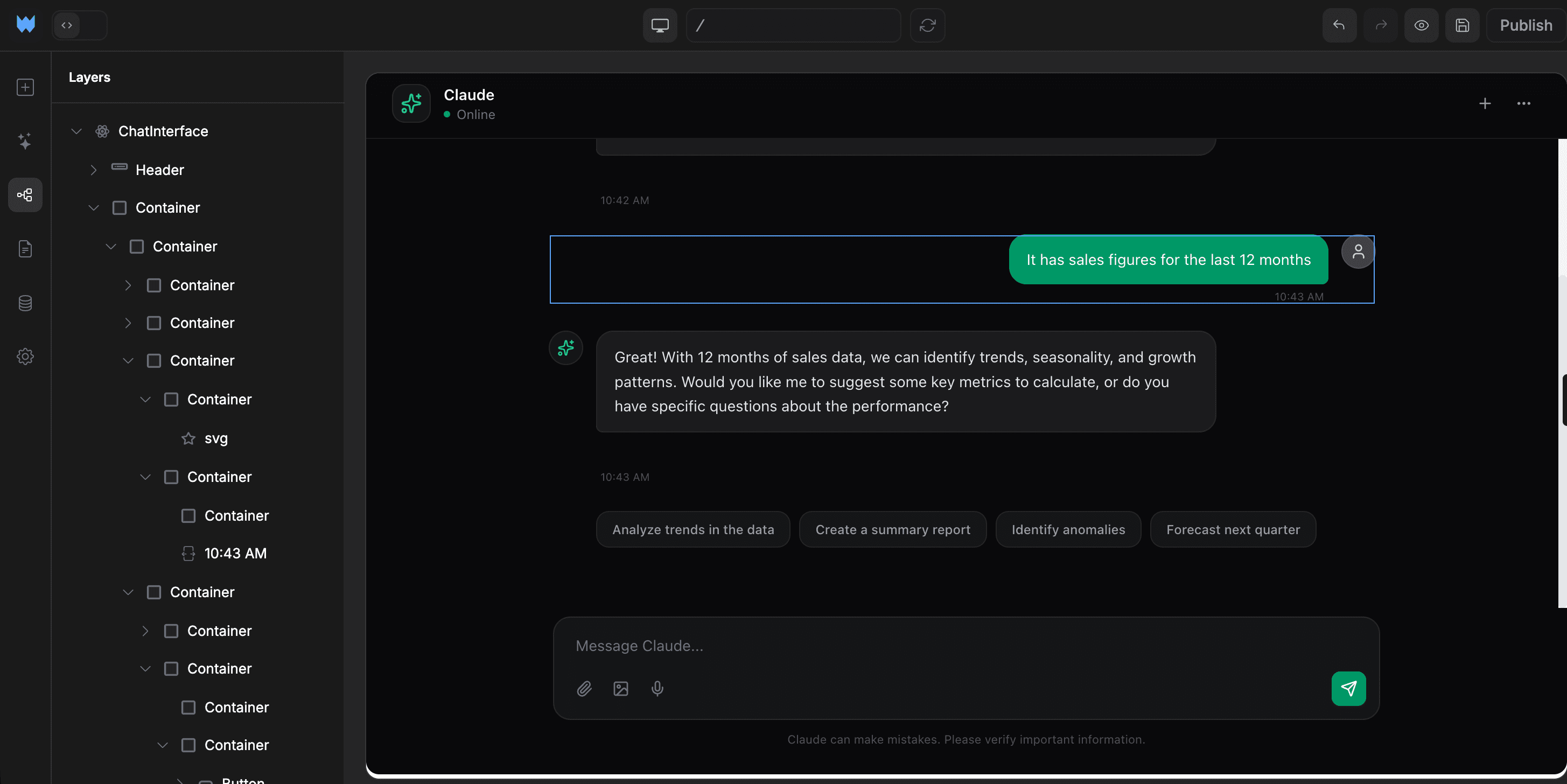
One-click integration. Paste your API key, it lands in env vars as OPENAI_API_KEY or ANTHROPIC_API_KEY. Webtwizz uses the streaming API so messages stream into the UI like ChatGPT.
Connect Supabase for conversations + (optional) knowledge base
Conversations and messages persist per user. For knowledge-base retrieval, Webtwizz can scaffold pgvector tables and embeddings. Paste your docs, AI chunks and embeds them, the chat queries with cosine similarity.
Style the chat UI
The chat bubble, message input, suggested-question chips: all editable visually. Match your brand colors. The streaming, scroll-to-bottom, and code-block rendering work out of the box.
Embed it on your site (optional)
Webtwizz generates an embed snippet, a `<script>` tag that drops a chat bubble into any site. Or use the standalone page at chat.yourdomain.com.
03 / Why it works
The parts other AI builders skip.
Anyone can scaffold a CRUD app. The reason these projects ship is the integration plumbing other builders leave for you.
Streaming responses, not "thinking…" spinners
Webtwizz wires up the OpenAI/Anthropic streaming SDK so tokens render as they arrive. Feels like ChatGPT.
Conversation history per user
Each user’s chats persist in Supabase. Switch between conversations, search past messages, delete what you don’t need.
Optional RAG (knowledge base) retrieval
Add your docs as a knowledge base. pgvector embeddings give the chatbot context-aware answers without fine-tuning.
Use any model you want
GPT-5, Claude, Gemini, Llama. The AI route is just a fetch call you can swap providers in. Or run multiple, route by question type.
04 / The stack
Wired up. One click each.
Supabase, Stripe, the email layer, the analytics layer. OAuth, env vars, webhooks, scaffolded routes, all generated correctly the first time.

OpenAI
GPT-5/4o for the chat backend. Streaming responses.

Anthropic
Claude as an alternative or fallback model.

Supabase
Conversations, messages, optional pgvector knowledge base.

Resend
Email escalation when the bot gets stuck.
OpenAI vs Claude vs both: which LLM your chatbot should call
OpenAI (GPT-4o / GPT-5). Default pick for general-purpose support and lead-gen bots. Cheaper per token, faster first-token latency, broadest model selection (4o-mini for cheap routing, 4o for quality, o1 for reasoning). The right default if you don't already have an opinion.
Anthropic Claude (Sonnet 4.6 / Opus 4.7). The right pick when conversation quality matters more than cost, sales chatbots, in-app product help, anything where tone and refusal behavior affect the experience. Claude is also stronger on long context (200K), so it shines for "talk to my docs" use cases where you stuff a giant knowledge base into the prompt.
Both, with routing. The mature pattern for serious chatbots: send short, simple questions to GPT-4o-mini at $0.15/M tokens, and route complex or high-stakes questions to Claude Sonnet at $3/M. Webtwizz scaffolds the routing layer if you ask for it, you describe the routing rule ("if message > 500 chars OR mentions account/billing, use Claude"), the AI writes the if/else.
Both integrations are pre-wired in Webtwizz. Connect once via OAuth, the keys are exposed as OPENAI_API_KEY and ANTHROPIC_API_KEY in your project's env vars, ready for the generated code to consume.
Embeddings, RAG, and "talk to my data": what actually works in 2026
If your chatbot needs to answer questions grounded in your own data (docs, support articles, product specs), you need embeddings + vector search, not just a long prompt.
The pattern Webtwizz scaffolds: a Supabase table with a pgvector column, an embedding job that runs when content changes, and a retrieval step in the chat route that pulls the top-K most relevant chunks before calling the LLM. This is "RAG". Retrieval-augmented generation. It's how every serious doc chatbot is built.
For most B2B chatbots under 10K documents, pgvector inside Supabase is the right call: one fewer service to run, queries co-located with your auth and user data. Past that, you graduate to Pinecone or Qdrant. Webtwizz can wire either; pgvector is the default because it's simpler.
What you should NOT do: stuff your entire knowledge base into the system prompt every request. Even with Claude's 200K context, you'll burn money and quality. Retrieve, then prompt.
FAQ
The honest answers.
The questions founders actually ask before they commit to a stack.
You can. They’re great if you want plug-and-play. The trade-off is per-conversation pricing, generic UI, and limited control over the model and prompt. Webtwizz gives you a chatbot you own: same model APIs, your prompt, your data, fixed cost.
Yes. Webtwizz uses the official OpenAI/Anthropic streaming SDK and renders tokens as they arrive. Feels exactly like ChatGPT or Claude.ai.
Two ways: (1) put your docs in the system prompt for short docs (works up to ~20k tokens), or (2) use pgvector RAG. Webtwizz scaffolds the embedding pipeline and the retrieval query.
OpenAI/Anthropic API costs (variable by model + usage), plus your Webtwizz hosting. For most chatbots, $5–50/month covers thousands of conversations. Way cheaper than $99–500/month per-vendor pricing.
Yes. Webtwizz generates a `<script>` embed snippet that drops a chat bubble into any HTML page: Wix, Webflow, Shopify, your existing Next.js site, anywhere.
Keep reading
More ways to build with AI.
Start building
Your idea, live in minutes.
Describe what you want. WebTwizz builds the real thing, then you click to change anything. No code needed.
Get started for free, no credit card needed.